1 Hour AI-Accelerated
Design Sprint
How do I orchestrate a high-speed design sprint utilizing AI and deliver a useful outcome?
Including the design judgment calls I caught that the AI missed: military surveillance conventions and bias baked into the prototype data.
Photo by Teryll KerrDouglas on Unsplash
I want to build a repeatable process, not a one-off experiment
v1 compressed a typical 5-day design sprint down to a 1 hour solo activity.
I ran 3 AI assistants simultaneously to research the problem space - Claude, ChatGPT, and Gemini. I evaluated outputs in parallel, feeding them back into each other for cross-checking and narrowing.
5 minutes was plenty of time to figure out the problem to solve. Illegal deep sea fishing enforcement is difficult and impactful: there's too much data to sift through (i.e. Satellite SAR) and packaging the evidence is arduous. That's a perfect opportunity for AI-powered software to solve.


Not only came up with 3 great problems to solve, it synthesized the information into "2026 Tech State" and software opportunities.
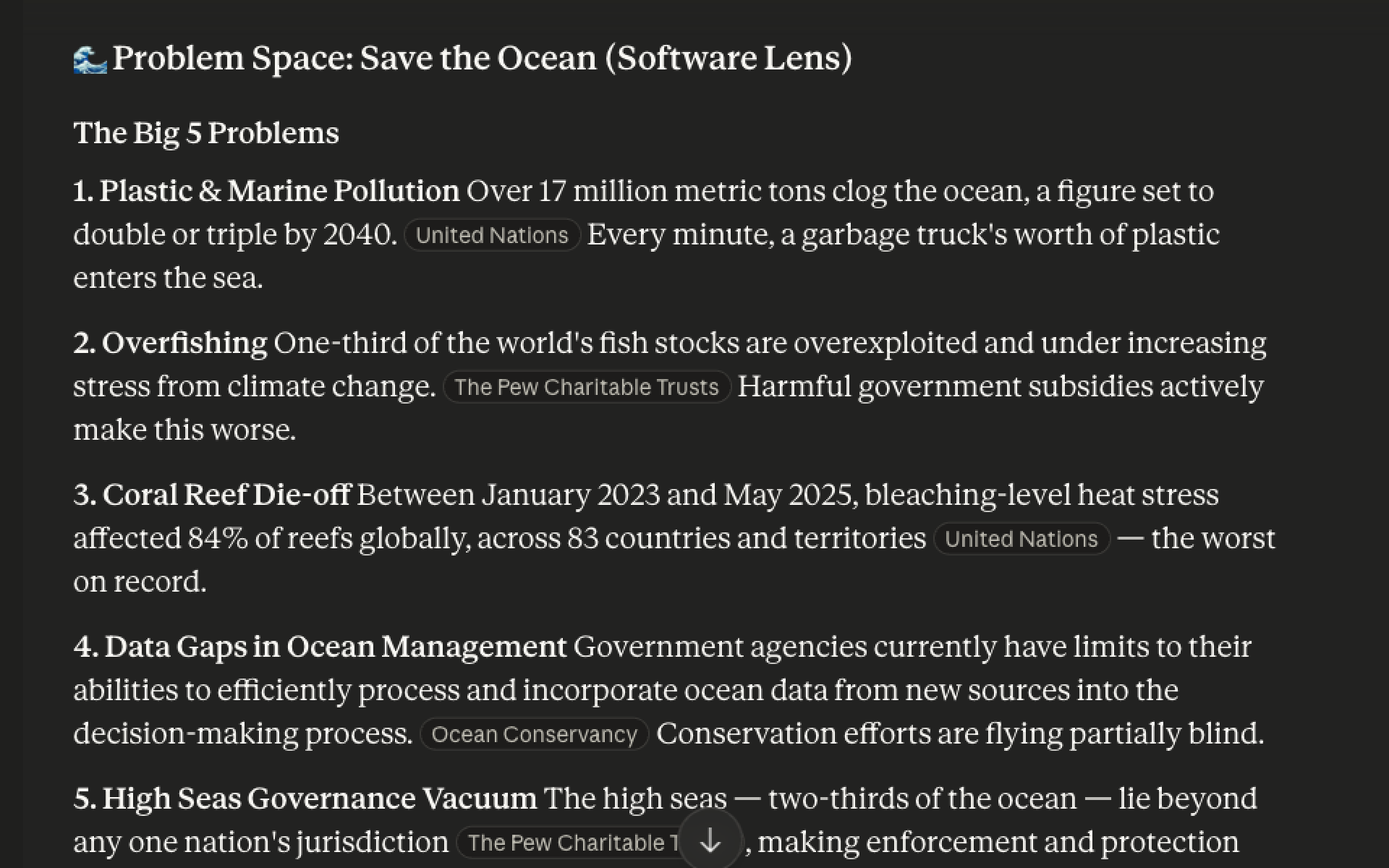

It gave similar ideas as other platforms, but there was too much to dig through. It wasn't synthesized as nicely.
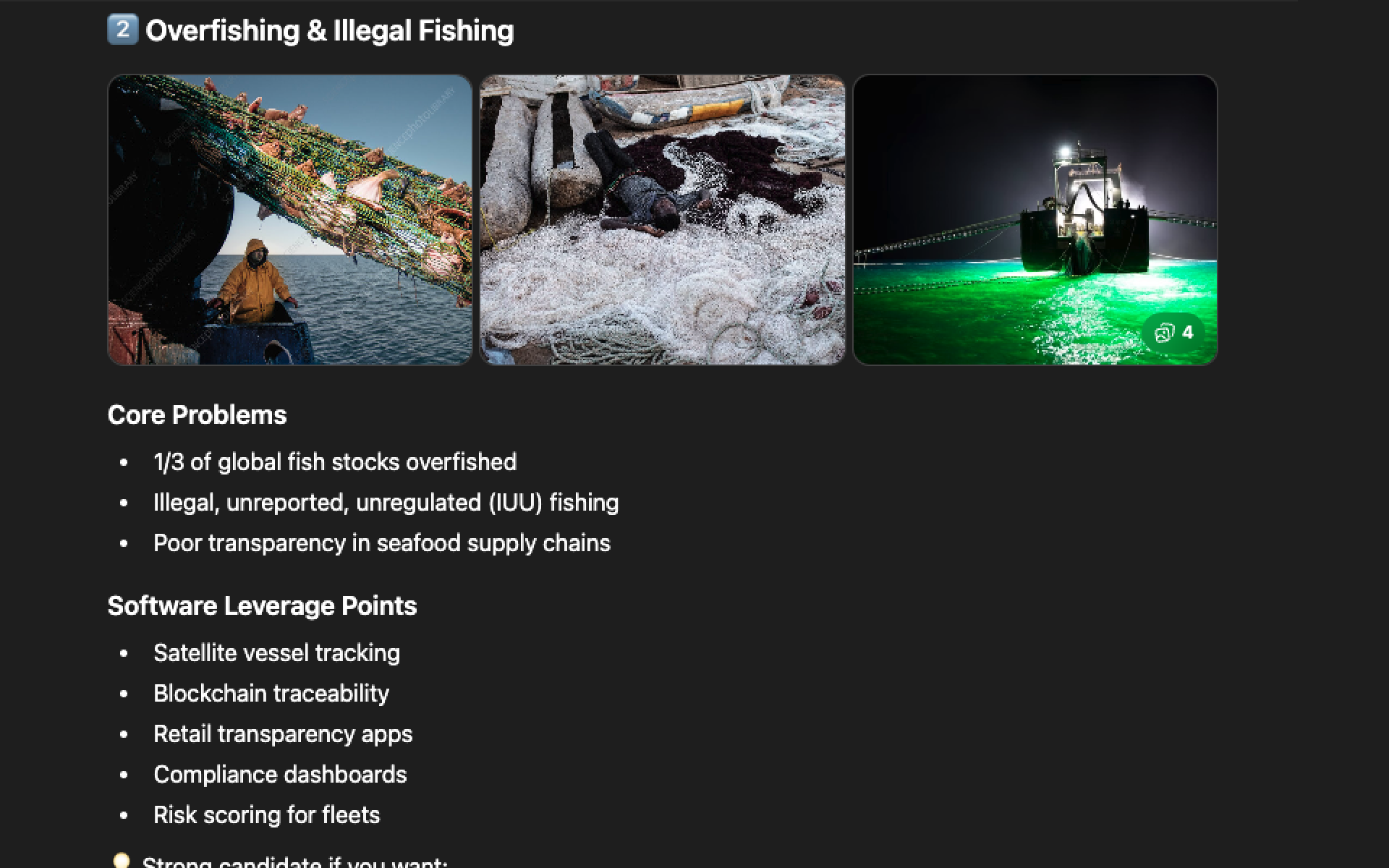

It was the only tool to show images with each problem, which helped my eyes. And it called out a personal note - that illegal fishing "aligns very well with your regulated systems brain."
What I thought would be distinct research & brainstorm phases ended up happening at the same time. As I asked questions about the problem, the LLMs generated users, workflows, solution ideas without my always asking.
I wanted to start with a structured deliverable to act as a high level definition. I prompted with a short template to guide the research.
Deliverable 1: Elevator Pitch
🌊 Save the Ocean by Turning Satellite Data into Enforceable Evidence
Every year, roughly 1 in 5 wild-caught fish is taken illegally — generating up to $36 billion in illicit profits while accelerating ecosystem collapse and eroding a key natural defense against global warming. The vessels responsible don't need sophisticated tools to hide. They simply turn off their tracking transponders and "go dark."
Satellites can often see ships at sea — but seeing isn't the same as proving wrongdoing. Enforcement depends on structured, defensible evidence.
We're building an AI-powered Maritime Evidence Engine that detects dark-vessel behavior using satellite and vessel-pattern analysis, then automatically transforms that data into enforcement-ready evidence packs. Instead of just surfacing alerts, the platform delivers explainable, auditable reports that regulators and seafood buyers can use to deny market access, escalate inspections, and block illegal catch before it enters the supply chain.
We're not just watching the ocean. We're enforcing its laws.
Process gap: v1 had no step to define the buyer. Without it, user and workflow were built on an assumption.
Fact checking: 1 in 5 and $36B unverified. Proceeded at risk.
After aligning all three tools on the elevator pitch, I used the AI tools to identify the core user & hero workflow.
Deliverable 2: Problem
Illegal fishing + the evidence gap
Satellites can detect dark vessels. But detection isn't enforcement. Authorities need structured, defensible evidence — AIS gap analysis, SAR cross-reference, zone violations, vessel history — assembled fast enough to act.
The platform must: Collapse the "glitch, buoy, or bust" question from a 20-minute manual investigation into a 90-second confident decision. Speed to confident decision — not just detection.
Fact checking: 20 min to 90 sec unverified. Proceeded at risk.
Deliverable 3: User

Process gap: no buyer defined meant the user choice was a guess. Risk noted above.
Retroactive: Persona icon and synthesis were done post-sprint, not during.
Deliverable 4: Workflow
The "First Look" — triage in 90 seconds
Process gap: v1 had no step to validate workflow choice against the 80% use case. Proceeded at risk.
The most fun: 7 prototypes in 30 min — across 6 tools
Each tool had varying amounts of context based on who had access to above conversations, which helps get variety in prototypes.
I thought Make and Tweak/Test would be two distinct sprint phases, but because each tool needed time to "think" it made sense to tweak ones while I waited for others to finish.
No winner selected. There were pros/cons to each and it'd be best to validate with users and more research.
Deliverable 5: Prototypes
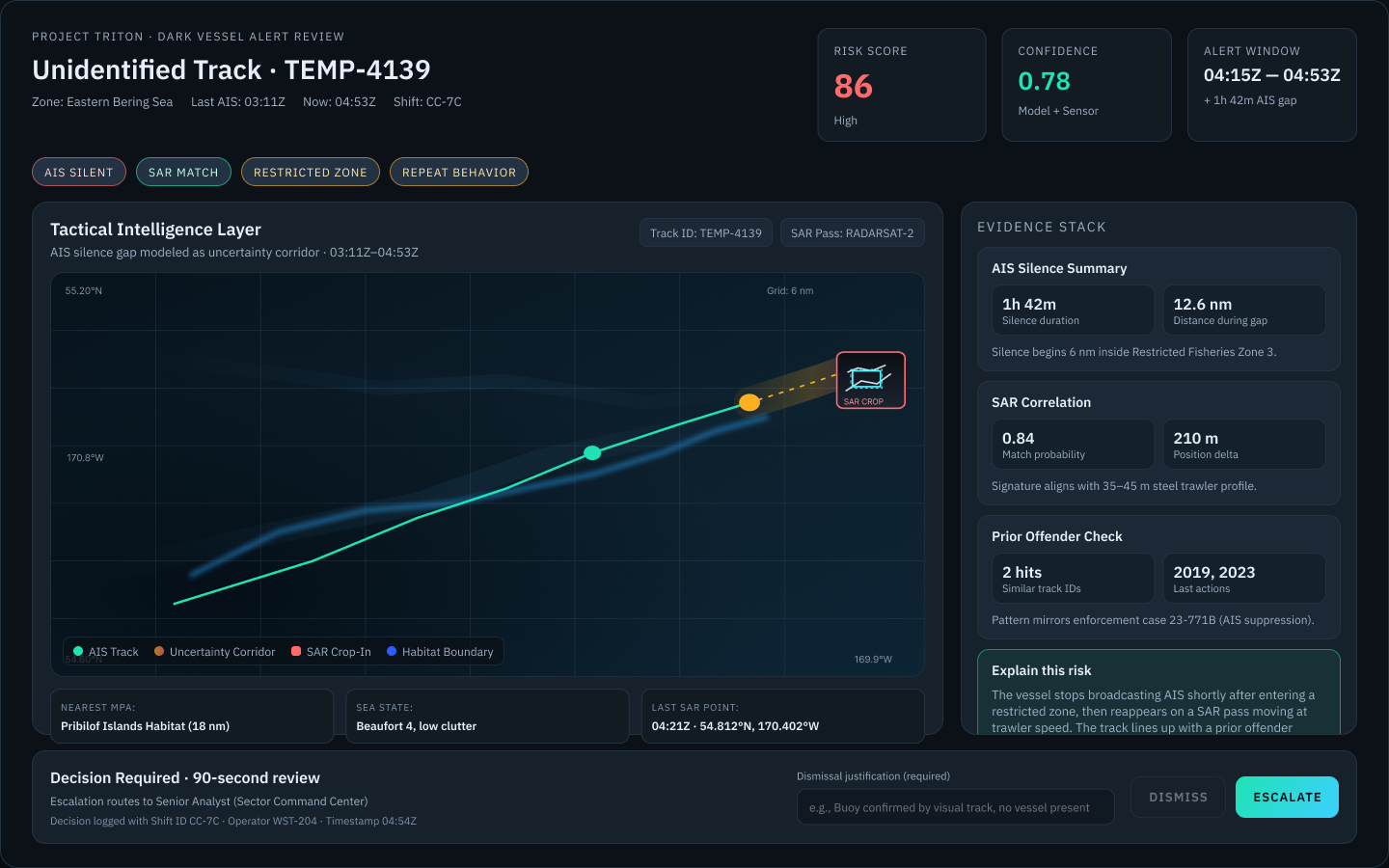
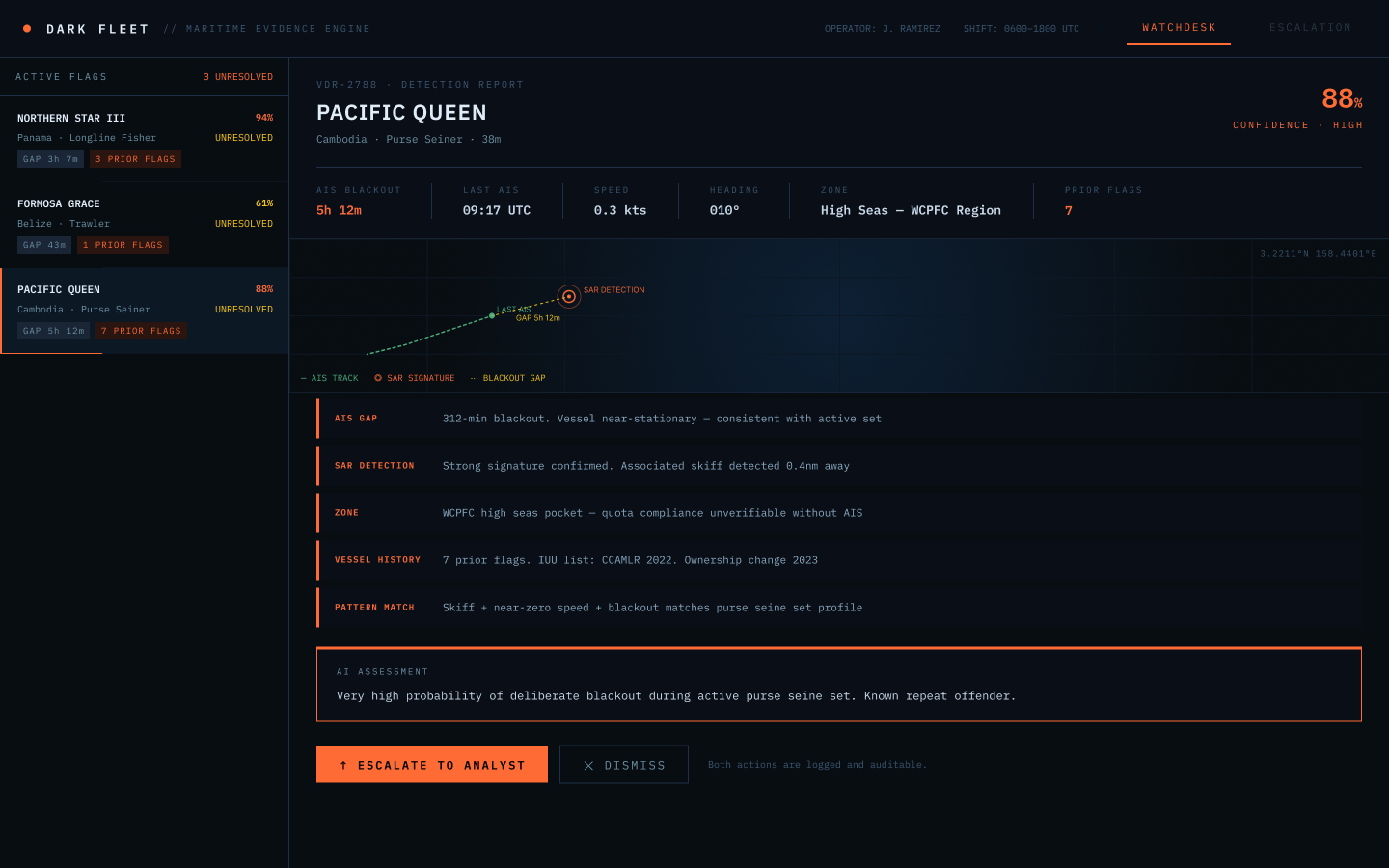


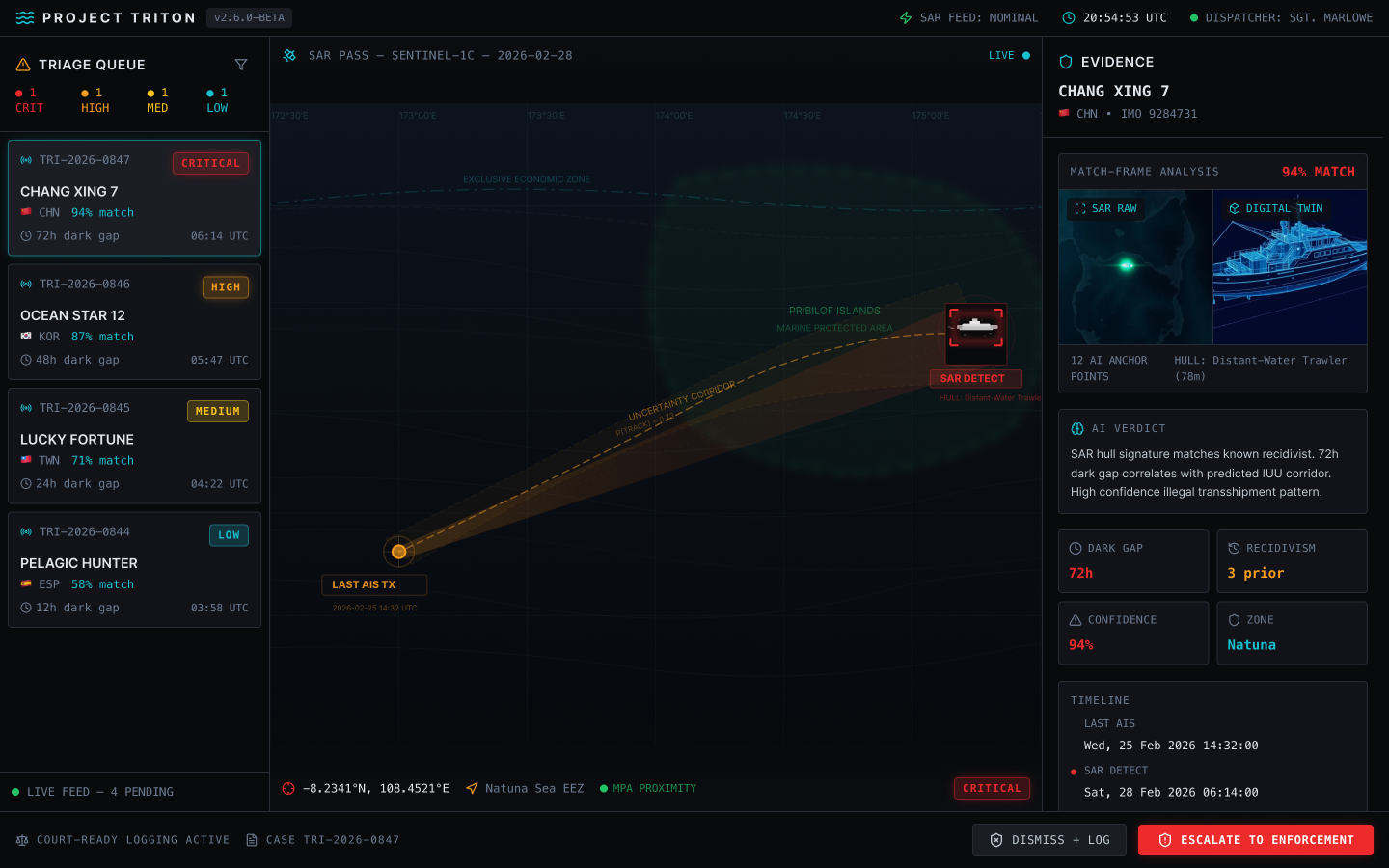

Human Judgement Corrections — too many to fix mid-sprint. See below.
AI moves fast. It also fills gaps with whatever conventions it knows. My job was to notice when those conventions were wrong for this context.
What I evaluated across the prototypes
Information hierarchy, accessibility, tone, and example data. All had pros and cons, so there's no clear "winner". Figma Make was the friendliest. Lovable was the most cinematic.
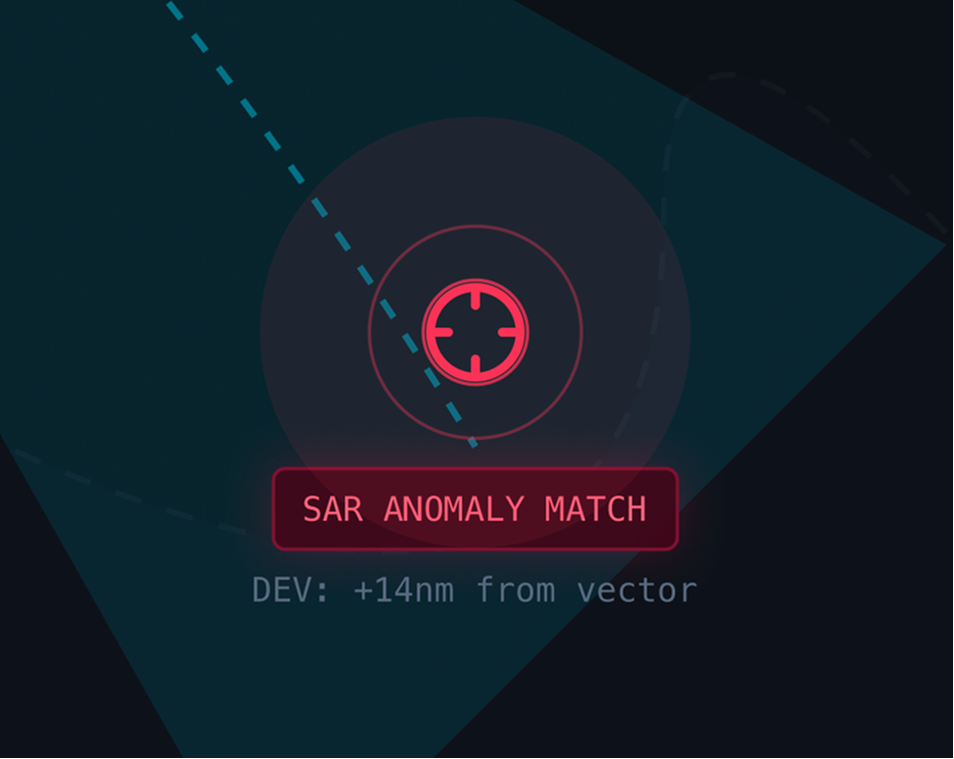
Tone: What AI defaulted to
Three of seven prototypes had targeting reticles on the map, which I hadn't asked for. The dark theme was partly my own doing (starting prompts), but the military surveillance conventions crept in on their own.
Example Data: What AI got wrong
Flags and real vessel names introduced political bias I wasn't comfortable with.
I caught it mid-sprint but didn't have time to resolve it all. Post-sprint I fixed the below example data. I also added tone and example data review to my v2 design sprint process.


Design correction
Vessel name nationality cues were replaced with neutral vessel identifiers to avoid unintended geopolitical implications in prototype data.
I could have changed the flags to be fictional, however post-sprint I did enough analysis to understand there is no user benefit to having a flag shown. It's just noise. An efficient compliance system prioritizes behavioral signals and evidence confidence.
Targeting reticles are being removed from map components, as unprompted military conventions that don't belong in a compliance tool.
Learnings from v1 of my Design Sprint Process
Design Sprint Process v1
1. Define a Big Problem
Identify the core problem to solve.
2. Research Problem Space
Gather context and existing data to ground the sprint.
3. Brainstorm Solutions
Ideate rapidly with AI chatbots for diverse options.
4. Make
High-fidelity AI prototyping using context defined.
5. Test / Tweak
Review outputs, iterate.
Pain Points:
- No business model defined: Who pays for Fair Seas? v1 never surfaced this. Without a customer definition the user and workflow were ill defined.
- No competitive research: What exists today? Post-sprint I found there are existing solutions which could have helped me strengthen a competitive advantage.
- No end artifact defined: I had to do a lot of retroactive artifact gathering after the sprint. Next time I want stronger deliverables defined.
- No accessibility constraints: Nearly every AI prototype had readability problems. I need to improve the starting prompts to include some guardrails.
- No screenshot discipline: Prototype iterations lived in 6 locations, not easily recoverable for the retrospective.
Design Sprint Process v2
1. Define the Sprint Deliverable
Choose the target artifacts: presentation, video, case study, or prototype demo.
2. Research & Explore
Ground the sprint with research, define the anchor card, set accessibility and tone requirements.
3. Make
Prototype and document decisions with screenshots at each step.
4. Test / Tweak
Validate against the deliverable. Review example data for real-world accusation implications.
5. Sprint Closeout
Capture final state, the anchor card, designate artifacts as verified or illustrative.
Deliverable: Sprint Anchor Card
- Problem statement (1-2 sentences)
- Customer (who pays, why)
- User (who, context, what they need)
- Key constraints (accessibility, tone, audience)
- 2-3 source verified facts to ground design direction
Changes Made:
- Defined deliverables: Added step "Define the Sprint Deliverables" first
- Consolidated inseparable steps: Combined steps 1–3 into one step "Research & Explore"
- Tone constraint: Added tone definition (i.e. tool, not weapon) to Research & Explore
- Documentation rigor: Added artifact "Sprint Anchor Card" to be maintained throughout the Design Sprint
- Documentation rigor: Added artifacts to the Make step (screenshots, url's, tips for each prototype) and Test/Tweak (changes made, screenshots)
- Added human judgement review: for example data in Test/Tweak phase
- Finishing cleanly: Added step "Sprint Closeout" to wrap up deliverables
GO ✓
Sprint 1 closed with a Go decision. The concept is real. The process is better. What comes next isn't another sprint — it's a structured validation phase before narrowing further.
- No business model defined: Who pays for Fair Seas? v1 never surfaced this. Without a customer definition the user and workflow were ill defined.
- No competitive research: What exists today? Post-sprint I found there are existing solutions which could have helped me strengthen a competitive advantage.
- No end artifact defined: I had to do a lot of retroactive artifact gathering after the sprint. Next time I want stronger deliverables defined.
- No accessibility constraints: Nearly every AI prototype had readability problems. I need to improve the starting prompts to include some guardrails.
- No screenshot discipline: Prototype iterations lived in 6 locations, not easily recoverable for the retrospective.
- Problem statement (1-2 sentences)
- Customer (who pays, why)
- User (who, context, what they need)
- Key constraints (accessibility, tone, audience)
- 2-3 source verified facts to ground design direction
- Defined deliverables: Added step "Define the Sprint Deliverables" first
- Consolidated inseparable steps: Combined steps 1–3 into one step "Research & Explore"
- Tone constraint: Added tone definition (i.e. tool, not weapon) to Research & Explore
- Documentation rigor: Added artifact "Sprint Anchor Card" to be maintained throughout the Design Sprint
- Documentation rigor: Added artifacts to the Make step (screenshots, url's, tips for each prototype) and Test/Tweak (changes made, screenshots)
- Added human judgement review: for example data in Test/Tweak phase
- Finishing cleanly: Added step "Sprint Closeout" to wrap up deliverables
Sprint 1 closed with a Go decision. The concept is real. The process is better. What comes next isn't another sprint — it's a structured validation phase before narrowing further.
Not every next step is a full sprint. This phase validates before building further — and may loop before moving on.
Fair Seas · Sprint 1 · Cami Farley